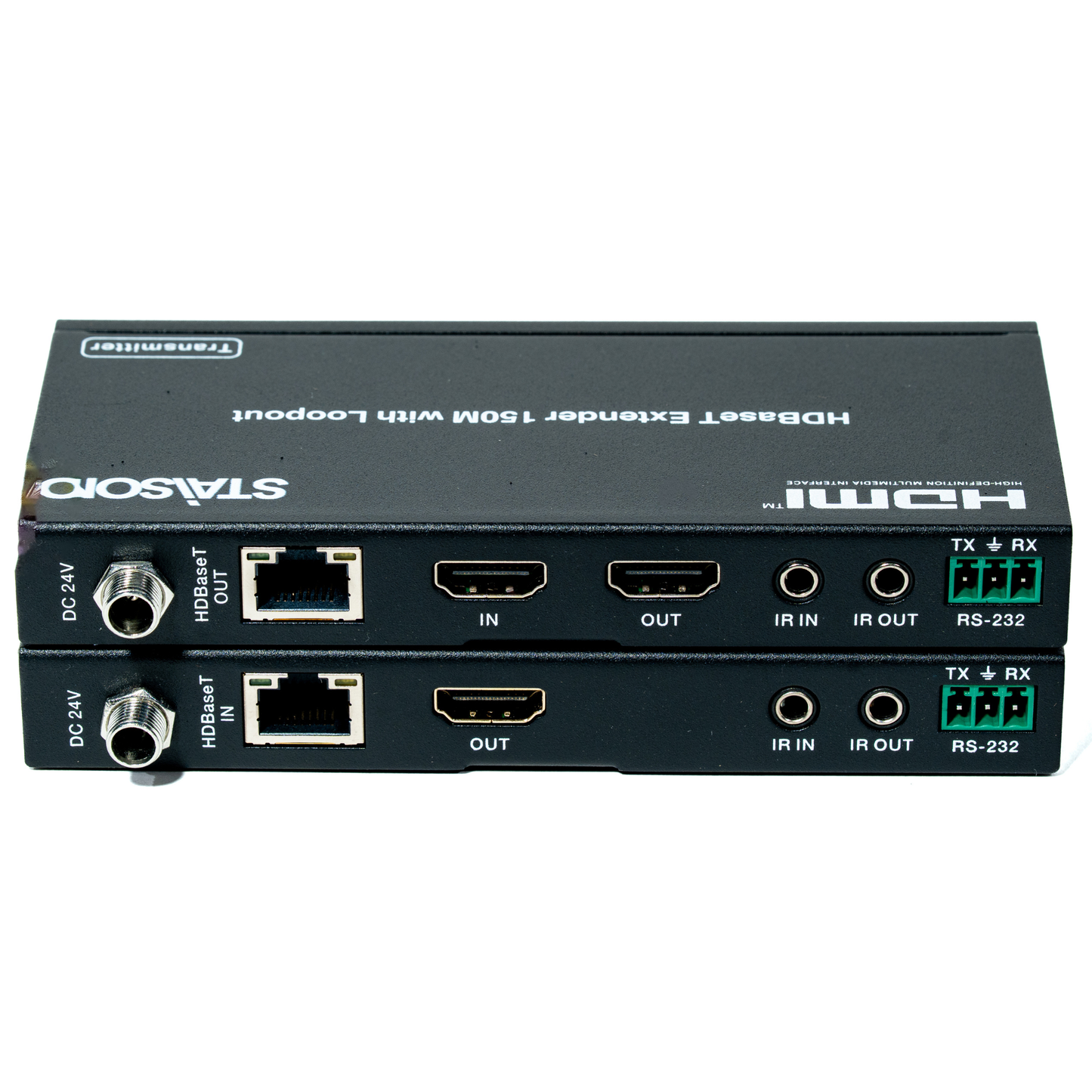
ST-NE150CL HDMI™ Extender 150m with Loopout
ST-NE150CL HDMI™ Extender 150m with Loopout
HDMI™ Extender 150m with Loopout
| Parameter | Detail |
|---|---|
| Technical | |
| HDMI Compliance | HDMI 1.4 |
| HDCP Compliance | HDCP 1.4 |
| Video Bandwidth | 165MHz |
| Video Resolutions | Up to 1080P @60Hz YUV4:4:4, RGB4:4:4 |
| Color Space | RGB, YUV4:4:4, YUV4:2:2 |
| Color Depth | 8-bit |
| HDMI Audio Formats | LPCM 2/5.1/7.1CH, Dolby Digital, DTS 5.1, Dolby Digital+, Dolby TrueHD, DTS-HD Master Audio, Dolby Atmos, DTS:X |
| ESD Protection | IEC 61000-4-2: ±8kV (Air-gap discharge), ±4kV (Contact discharge) |
| Transmitter Connections | |
| Inputs | 1× IN [HDMI Type A, 19-pin female] 1× IR IN [3.5mm stereo mini-jack] 1× RS-232 [phoenix jack] |
| Outputs | 1× HDBaseT OUT [RJ45] 1× OUT [HDMI Type A, 19-pin female] — Loopout 1× IR OUT [3.5mm stereo mini-jack] |
| Receiver Connections | |
| Inputs | 1× HDBaseT IN [RJ45] 1× IR IN [3.5mm stereo mini-jack] |
| Outputs | 1× OUT [HDMI Type A, 19-pin female] 1× IR OUT [3.5mm stereo mini-jack] 1× RS-232 [phoenix jack] |
| Mechanical | |
| Housing | Metal Enclosure |
| Color | Black |
| Dimensions | 140mm [W] × 65mm [D] × 18mm [H] |
| Weight | 481g |
| Power Supply | Input: AC 100–240V 50/60Hz | Output: DC 24V/1A (CE/FCC/UL certified) |
| Power Consumption | 6W (max) |
| Operating Temperature | 0°C ~ 40°C / 32°F ~ 104°F |
| Storage Temperature | -20°C ~ 60°C / -4°F ~ 140°F |
| Relative Humidity | 20~90% RH (non-condensing) |
5.1 — Transmitter Panel
| No. | Name | Function Description |
|---|---|---|
| 1 | Power LED | System power indicator. |
| 2 | DC 24V | Connect 24V/1A adaptor to AC wall outlet for power supply. |
| 3 | HDBaseT OUT | Standard HDBaseT output port. Connect to HDBaseT receiver with a UTP cable using the direct interconnection method. |
| 4 | IN | Connect to HDMI source device such as Blu-ray or PS4 player. |
| 5 | OUT | Connect to HDTV or monitor HDMI input port (Loopout). |
| 6 | IR IN | Channel 2 IR Receiver. Connect to an IR receiver cable. |
| 7 | IR OUT | Channel 1 IR Transmitter. Connect to an IR emitter cable. |
| 8 | RS-232 | 3-pin phoenix connector, used for RS-232 command transmission. |
| 9 | Connection Signal Indicator |
Illuminated: Transmitter and Receiver are in good connection. Flashing: Transmitter and Receiver are in poor connection. Dark: Not connected. |
| 10 | Data Signal Indicator |
Illuminated: HDMI signal with HDCP. Flashing: HDMI signal without HDCP. Dark: No HDMI signal. |
5.2 — Receiver Panel
| No. | Name | Function Description |
|---|---|---|
| 1 | Power LED | System power indicator. |
| 2 | DC 24V | Connect 24V/1A adaptor to AC wall outlet for power supply. |
| 3 | HDBaseT IN | Standard HDBaseT input port. Connect to HDBaseT Transmitter with a UTP cable using the direct interconnection method. |
| 4 | OUT | Connect to the HDTV or monitor. |
| 5 | IR IN | Channel 1 IR Receiver. Connect to an IR receiver cable. |
| 6 | IR OUT | Channel 2 IR Transmitter. Connect to an IR emitter cable. |
| 7 | RS-232 | 3-pin phoenix connector, used for RS-232 command transmission. |
| 8 | Connection Signal Indicator |
Illuminated: Transmitter and Receiver are in good connection. Flashing: Poor connection. Dark: Not connected. |
| 9 | Data Signal Indicator |
Illuminated: HDMI signal with HDCP. Flashing: HDMI signal without HDCP. Dark: No HDMI signal. |
POC — Power over Cable
Only one 24V/1A power supply is required. Connect it to either the Transmitter or the Receiver — the power is delivered over the CAT5e/6/7 cable to the unpowered unit automatically.
Bi-directional IR Control
IR signals travel in both directions over the CAT cable alongside the HDMI signal. Control your DVD player from the TV side (TX1→RX2), or control your TV from the DVD player side (RX1→TX2).
Bi-directional RS-232
RS-232 serial commands are transmitted bidirectionally alongside the HDMI signal over the CAT cable. Control an HDMI Matrix or other RS-232 devices at either end of the extension.
How it works: The Transmitter receives HDMI from a DVD / Blu-ray Player, outputs a local Loopout to a nearby TV/Monitor, and sends the signal over a single CAT5e/6 cable up to 150m to the Receiver. The Receiver delivers HDMI to a remote TV / Monitor. A Notebook can send RS-232 commands via the Transmitter across to an HDMI Matrix at the Receiver end. IR remotes control devices bidirectionally at either end. Only one 24V power supply is needed — POC delivers power over the CAT cable.
Product features
Product features
Materials and care
Materials and care
Merchandising tips
Merchandising tips