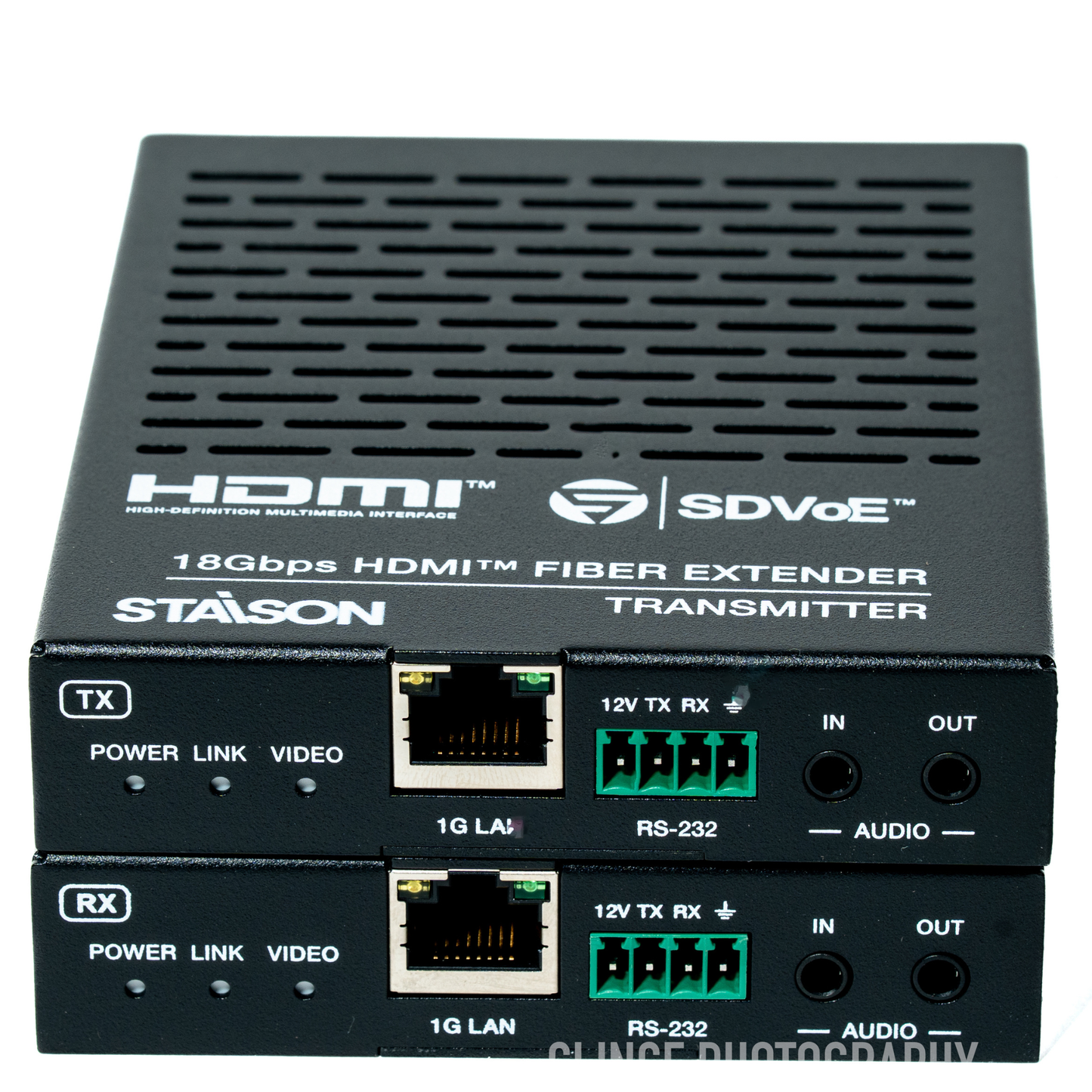
ST-NEB100ASLKIT 4K60 HDMI™ 10G Fiber Extender with Bi-directional Audio
ST-NEB100ASLKIT 4K60 HDMI™ 10G Fiber Extender with Bi-directional Audio
Regular price
0.00 SAR
Regular price
Sale price
0.00 SAR
The 4K60 HDMI™ over fiber extender is based on SDVoE technology for distributing one UHD content to one UHD display device. It features a 10G fiber port that can extend signals up to 10km via single-mode fiber cable, or 300m via multi-mode fiber cable. It provides highest-quality, uncompressed 4K60 and zero-frame latency audio/video extension.
ST-NEB100ASLKIT · VER 1.0
4K60 HDMI™ 10G Fiber Extender
with Bi-directional Audio
SDVoE Technology · HDMI™ 2.0b · HDCP 2.2 · Zero-Frame Latency · 2× SFP+ Modules Included
1. Introduction
The 4K60 HDMI™ over fiber extender is based on SDVoE technology for distributing one UHD content to one UHD display device. It features a 10G fiber port that can extend signals up to 10km via single-mode fiber cable, or 300m via multi-mode fiber cable. It provides highest-quality, uncompressed 4K60 and zero-frame latency audio/video extension.
The 1G LAN port serves as a utility port for product management or Ethernet extension. The Transmitter (TX) supports HDMI™ loop out. The extender supports bi-directional analog stereo audio pass-through and RS-232 with 12V voltage output on connector.
The 1G LAN port serves as a utility port for product management or Ethernet extension. The Transmitter (TX) supports HDMI™ loop out. The extender supports bi-directional analog stereo audio pass-through and RS-232 with 12V voltage output on connector.
2. Features
3. Package Contents
📦 Complete Kit Contents
1
4K60 HDMI™ 10G Fiber Extender — Transmitter (TX)1
4K60 HDMI™ 10G Fiber Extender — Receiver (RX)4
Mounting Ears8
Machine Screws (KM3×4)2
12V/1A Locking Power Supplies2
4-pin 3.5mm Phoenix Connectors (Male)2
Optical Fiber Modules (SFP-BL32TG-10DC for TX + SFP-BL23TG-10DC for RX)1
User Manual
4. Specifications
| Parameter | Specification |
|---|---|
| Technical | |
| HDMI™ Compliance | HDMI™ 2.0b |
| HDCP Compliance | HDCP 2.2 |
| Video Bandwidth | 594MHz / 18Gbps |
| Video Compression | SDVoE (Uncompressed) |
| Color Space | RGB, YCbCr 4:4:4 / 4:2:2, YUV 4:2:0 |
| Color Depth | 8/10/12-bit |
| HDR | HDR, Dolby Vision, HLG |
| ESD Protection | IEC 61000-4-2: ±15kV (Air-gap discharge) & ±8kV (Contact discharge) |
| Video | |
| Input Video Resolution | 640×480p60 ~ 4096×2160p60Hz (480i/p, 576i/p, 720p, 1080i/p, 2160p at various frame rates up to 4096×2160p60) |
| Output Video Resolution | Pass-through |
| Video Latency | Zero latency |
| Audio | |
| Audio Formats | LPCM 2/5.1/7.1, Dolby Digital, Dolby Digital+, Dolby True HD, Dolby Atmos, DTS 5.1, DTS-HD Master Audio, DTS:X |
| Audio Latency | Zero latency |
| Audio Sample Rate | 22.05 / 24 / 32 / 44.1 / 48 / 88.2 / 96 / 176.4 / 192kHz |
| L/R IN/OUT Level | 1Vrms @ unbalanced audio |
| Input Impedance | 10K Ohms |
| Output Impedance | 330 Ohms |
| Frequency Response | +0.5dB / -0.5dB, 20Hz to 20kHz |
| Audio S/N Ratio | Line out: 88dB@0dBFS,1kHz A-weighted; Line in: 95dB@0dBFS,1kHz A-weighted |
| Audio THD+N | Line out: 0.036%@0dBFS,1kHz; Line in: 0.01%@0dBFS,1kHz |
| Audio Output Sync Delay | 0 to 50ms |
| Network & Transmission | |
| Video Network Bandwidth | 10Gbps (SFP+) |
| Transmission Distance | Single-mode fiber: up to 10km Multi-mode fiber: up to 300m HDMI™ passive cable: 5m@4K60 / 10m@4K30 / 15m@1080p60 |
| Transmitter Connections | |
| Input | 1× IN [HDMI™ Type A, 19-pin female] · 1× AUDIO IN [3.5mm jack] |
| Output | 1× SFP+ [Fiber, 10Gbps] · 1× OUT [HDMI™ Type A, loop] · 1× AUDIO OUT [3.5mm jack] |
| Control | 1× 1G LAN [RJ45] · 1× RS-232 [4-pin 3.5mm Phoenix connector] |
| Receiver Connections | |
| Input | 1× SFP+ [Fiber, 10Gbps] · 1× AUDIO IN [3.5mm jack] |
| Output | 1× OUT [HDMI™ Type A, 19-pin female] · 1× AUDIO OUT [3.5mm jack] |
| Control | 1× 1G LAN [RJ45] · 1× RS-232 [4-pin 3.5mm Phoenix connector] |
| Mechanical | |
| Housing | Metal Enclosure — Black |
| Dimensions | 95mm [W] × 120mm [D] × 21.5mm [H] |
| Weight | Transmitter: 329g; Receiver: 323g |
| Power Supply | Input: AC100–240V 50/60Hz; Output: DC 12V/1A (US/EU, CE/FCC/UL certified) |
| Power Consumption (Max) | Transmitter: 5.52W; Receiver: 5.04W |
| Environmental | |
| Operating Temperature | 0°C ~ 40°C / 32°F ~ 104°F |
| Storage Temperature | -20°C ~ 60°C / -4°F ~ 140°F |
| Operating Humidity | 20% ~ 80% RH (no condensation) |
| Storage Humidity | 10% ~ 90% RH (no condensation) |
5. Operation Controls and Functions
5.1 Transmitter (TX) Panel
Transmitter — Front & Rear Panels
| No. | Name | Function Description |
|---|---|---|
| 1 | POWER LED (Yellow-green) | On when unit is powered on. Off when powered off. |
| 2 | LINK LED (Yellow-green) | On: 10G network linked. Off: 10G network not linked. |
| 3 | VIDEO LED (Yellow-green) | On: Video signal detected on IN port and locked. Flashing: Video detected but cannot lock. |
| 4 | 1G LAN port | 1G network port — connect to 1G Ethernet or PC. Link Signal (Green): on = cable connected normally. Data Signal (Yellow): flashing = data transmitting. |
| 5 | RS-232 port | Connect to PC or control system via 4-pin phoenix connector for configuration or RS-232 pass-through. Default baud rate: 57600. "12V" pin supplies power (100mA) to peripheral. |
| 6 | RS-232 (cont.) | 4-pin block carries: 12V · TX · RX · GND. |
| 8 | AUDIO IN port | Analog audio input — stereo audio pass-through and HDMI audio embedding. |
| 9 | AUDIO OUT port | Analog audio output — bi-directional stereo analog audio pass-through. |
| 10 | DC 12V port | DC 12V/1A locking power input port. |
| 11 | RESET button | Press and hold 5 seconds (power on) — LINK and VIDEO LEDs flash at 1Hz simultaneously, then release to restore default settings. |
| 12 | IN port | HDMI signal input — connect to HDMI source device (Blu-ray Player, set-top box) with HDMI cable. |
| 13 | OUT port | HDMI local loop output — connect to an HDMI display device (TV, monitor). |
| 14 | SFP+ port | 10G fiber optical port — connected with transmitter optical fiber module (SFP-BL32TG-10DC); transmits signals to the receiver via optical fiber cable. |
5.2 Receiver (RX) Panel
Receiver — Front & Rear Panels
| No. | Name | Function Description |
|---|---|---|
| 1 | POWER LED (Yellow-green) | On when unit is powered on. Off when powered off. |
| 2 | LINK LED (Yellow-green) | On: 10G network linked. Off: 10G network not linked. |
| 3 | VIDEO LED (Yellow-green) | On: Video signal detected on IN port and locked. Flashing: Video detected but cannot lock. |
| 4 | 1G LAN port | 1G network port — connect to 1G Ethernet or PC. Link Signal (Green): on = cable connected. Data Signal (Yellow): flashing = data transmitting. |
| 5 | RS-232 port | Connect to PC or control system via 4-pin phoenix connector. Default baud rate: 57600. "12V" pin supplies power (100mA) to peripheral. |
| 6 | RS-232 (cont.) | 4-pin block carries: 12V · TX · RX · GND. |
| 8 | AUDIO IN port | Analog audio input — stereo audio pass-through and HDMI audio embedding. |
| 9 | AUDIO OUT port | Analog audio output — bi-directional stereo analog audio pass-through. |
| 10 | DC 12V port | DC 12V/1A locking power input port. |
| 11 | RESET button | Press and hold 5 seconds (power on) — LINK and VIDEO LEDs flash at 1Hz simultaneously, then release to restore default settings. |
| 12 | OUT port | HDMI signal output — connect to HDMI display device (TV, monitor) with HDMI cable. |
| 13 | SFP+ port | 10G fiber optical port — connected with receiver optical fiber module (SFP-BL23TG-10DC); receives signals from the transmitter via optical fiber cable. |
5.3 Optical Fiber Module
1SFP-BL32TG-10DC
Transmitter (TX) Optical Fiber Module
10G Tx1270/Rx1330nm · 10km · BiDi SFP+
Class 1 Laser Product 21CFR(J) · ROHS & CE compliant
10G Tx1270/Rx1330nm · 10km · BiDi SFP+
Class 1 Laser Product 21CFR(J) · ROHS & CE compliant
2SFP-BL23TG-10DC
Receiver (RX) Optical Fiber Module
10G Tx1330/Rx1270nm · 10km · BiDi SFP+
Class 1 Laser Product 21CFR(J) · ROHS & CE compliant
10G Tx1330/Rx1270nm · 10km · BiDi SFP+
Class 1 Laser Product 21CFR(J) · ROHS & CE compliant
⚠ Important — Matched Pair Required The TX and RX use different wavelengths (BiDi / Bi-Directional) and must be used as a matched pair over a single-strand fiber cable. Do not mix TX and RX modules — SFP-BL32TG-10DC is for the Transmitter only, SFP-BL23TG-10DC is for the Receiver only.
6. RS-232 Baudrate Settings
This product supports RS-232 baudrate settings via the Upper Computer software ("10G Fiber Extender Control Tool"). Contact your supplier for the installation package. The default RS-232 settings are: Baud rate: 57600 · Data bits: 8 · Parity: None · Stop bits: 1.
1
Connect both the Transmitter and Receiver to a PC via the 1G LAN port.
2
Install the Upper Computer software on the PC. (Contact your supplier for the installation package.)
3
Double-click the "10G Fiber Extender C…" icon to open the Upper Computer. The main interface shows a Device List panel on the left and RS-232 settings (Baud rate, Data bits, Parity, Stop bits) on the right.
4
Click "Search Device" to discover connected devices. Both the Transmitter (Encoder) and Receiver (Decoder) will appear in the Device List with their IP addresses and MAC addresses.
5
Click a device in the Device List, then set the desired Baud rate, Data bits, Parity and Stop bits. Click "Apply" to save. Repeat for the other device if needed. You can click the refresh icon to refresh the list, or "Clear All" to reset.
Upper Computer Interface
7. Application Example
Presentation / Conference Room Setup — Laptop to Projector & TV with Bi-directional Audio & RS-232
How it works: A Laptop at the source connects via HDMI to the Transmitter (TX). The TX sends uncompressed 4K60 video over a single fiber cable up to 10km to the Receiver (RX). The TX's loop output provides a local TV feed at the source. The RX outputs HDMI to a remote TV. RS-232 passes through bi-directionally, controlling a projector with motorized curtain. A MIC at each end feeds into the audio IN for bi-directional analog audio, with speakers at the display end. Both units connect via CAT cable to a shared Router for management.
The terms HDMI, HDMI High-Definition Multimedia Interface, HDMI trade dress and the HDMI Logos are trademarks or registered trademarks of HDMI Licensing Administrator, Inc.
Product features
Product features
Materials and care
Materials and care
Merchandising tips
Merchandising tips