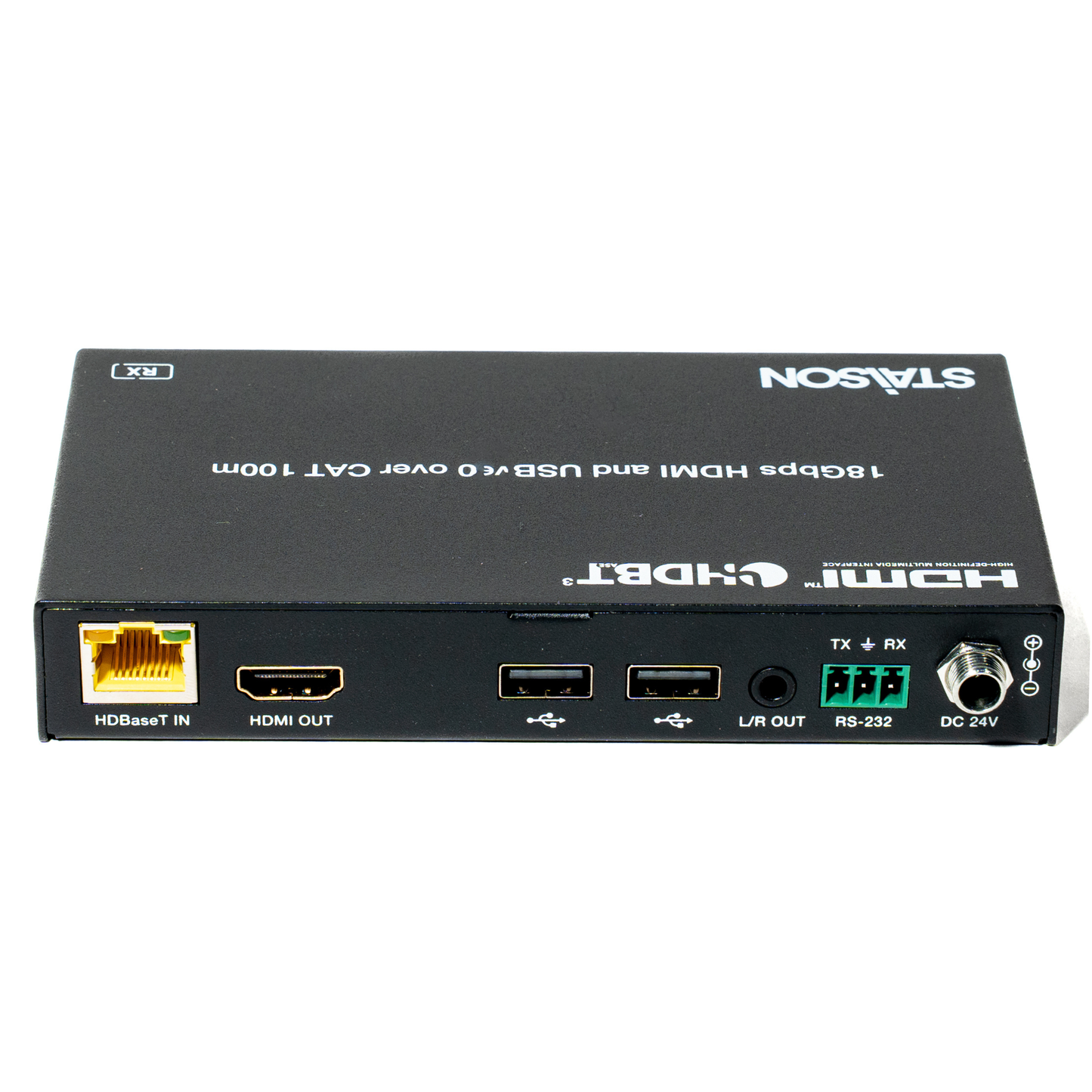
ST-NEHB100U3K 18Gbps HDBaseT 3.0 Extender (100m) with USB 2.0
ST-NEHB100U3K 18Gbps HDBaseT 3.0 Extender (100m) with USB 2.0
`This 18Gbps HDBaseT 3.0 Extender can extend uncompressed HD/UHD
video and audio signals, RS-232, bi-directional IR, and USB 2.0 signals up to
328ft / 100m via a single CAT6A/7 cable. Video resolution is up to 4K2K@60Hz
YUV 4:4:4. The Transmitter supports HDMI input and audio de-embedding.
The Receiver supports HDMI output and audio de-embedding. The Extender
supports bi-directional RS-232 and IR signal pass-through, EDID management,
USB 2.0 signal transmission and bi-directional POC function. In addition, the
Transmitter can switch between HDBT Standard Mode (as factory default) and
HDBT Long Reach Mode.
The Extender offers the most convenient solution for HDMI extension via a
single CAT cable with long distance capability, and is the perfect solution for
home/commercial application.
Features
☆ HDMI 2.0b and HDCP 2.2 compliant
☆ Support 18Gbps video bandwidth
☆ Support video resolution up to 4K2K@60Hz (YUV 4:4:4)
☆ HDR, HDR10, HDR10+, Dolby Vision LLM and HLG pass through
☆ LPCM, Dolby Digital/Plus/EX, Dolby True HD, DTS, DTS-EX, DTS-96/24,
DTS High Res, DTS-HD Master Audio, DSD pass through
☆ 4K transmission distance up to 328ft/100m via a single CAT6A/7 cable
(HDBT standard mode)
☆ 1080P transmission distance up to 492ft/150m via a single CAT6/6A/7
cable (HDBT long reach mode)
☆ Support bidirectional POC (Power over Cable), when TX or RX gets power,
the other end does not need an external power supply
☆ Support 3.5mm analog audio de-embedding at TX and RX
☆ EDID management
☆ Support bi-directional RS-232 signal pass-through, bi-directional IR signal
control, USB2.0 signal transmission
☆ Compact design for easy and flexible installation
Package Contents
① 1 × HDBaseT 3.0 Extender (Transmitter)
② 1 × HDBaseT 3.0 Extender (Receiver)
③ 1 × IR Blaster Cable (1.5 meters)
④ 1 × IR Receiver Cable (1.5 meters)
⑤ 2 × 3pin-3.81mm Phoenix Connectors (Male)
⑥ 4 × Mounting Ears
⑦ 8 × Machine Screws (KM3*4)
⑧ 1 × 24V/1A Locking Power Adapter
⑨ 1 × User Manual
Specifications
| Parameter | Value |
|---|---|
| Technical | |
| HDMI Compliance | HDMI 2.0b |
| HDCP Compliance | HDCP 2.2 |
| Video Bandwidth | 18Gbps |
| Video Resolution | Up to 4K@60Hz |
| Color Space | RGB, YCbCr 4:4:4, YCbCr 4:2:2, YCbCr 4:2:0 |
| Color Depth | 8/10/12-bit |
| HDR | HDR, HDR10, HDR10+, Dolby Vision, HLG |
| Audio Formats | LPCM, Dolby Digital/Plus/EX, Dolby True HD, DTS, DTS-EX, DTS-96/24, DTS High Res, DTS-HD Master Audio, DSD |
| IR Level | 12Vp-p |
| Transmission | |
| Transmission Distance | HDBT Standard Mode: 4K60 / 100m; 1080P / 100m (CAT6A/7 cable) HDBT Long Reach Mode: 1080P / 150m (CAT6/6A/7 cable) |
| Connection – Transmitter | |
| Input | 1 × HDMI IN [Type A, 19-pin female] |
| Outputs | 1 × HDBaseT OUT [RJ45 connector] 1 × L/R OUT [3.5mm Stereo Mini-jack] |
| Controls | 1 × IR IN [3.5mm Stereo Mini-jack] 1 × IR OUT [3.5mm Stereo Mini-jack] 1 × RS-232 [3pin-3.81mm Phoenix jack] 1 × SERVICE [Micro USB, 5-pin female] 1 × USB HOST [USB Type B] 2 × USB DEVICES [USB Type A] |
| Connection – Receiver | |
| Input | 1 × HDBaseT IN [RJ45, 8-pin female] |
| Outputs | 1 × HDMI OUT [Type A, 19-pin female] 1 × L/R OUT [3.5mm Stereo Mini-jack] |
| Controls | 1 × IR IN [3.5mm Stereo Mini-jack] 1 × IR OUT [3.5mm Stereo Mini-jack] 1 × RS-232 [3pin-3.81mm Phoenix jack] 1 × SERVICE [Micro USB, 5-pin female] 2 × USB DEVICES [USB Type A] |
| Mechanical | |
| Dimensions | Transmitter / Receiver: 144mm [W] x 78mm [D] x 23mm [H] |
| Housing | Metal Enclosure |
| Color | Black |
| Weight | Transmitter: 323g, Receiver: 319g |
| Environmental | |
| Power Supply | Input: AC 100 - 240V 50/60Hz Output: DC 24V/1A (US/EU standard, CE/FCC/UL certified) |
| Power Consumption | 14.28W (POC) |
| Operating Temperature | 32 - 104°F / 0 - 40°C |
| Storage Temperature | -4 - 140°F / -20 - 60°C |
| Relative Humidity | 20 - 90% RH (no condensation) |
Operation Controls and Functions
Transmitter Panel

| No. | Name | Function Description |
|---|---|---|
| 1 | Power LED | Red LED indicates that the Transmitter is powered on. |
| 2 | LINK LED | Light on: Transmitter and Receiver are in good connection status. Light flashing: Transmitter and Receiver are in poor connection status or connected to the same device. Light off: Transmitter and Receiver are not connected. |
| 3 | IR IN | IR signal input port, connected to IR Receiver cable. |
| 4 | IR OUT | IR signal output port, connected to IR Blaster cable. |
| 5 | MODE switch | Used to switch HDBT mode. Switch to "STD": The HDBT Standard Mode (as factory default) is enabled, it can extend 4K60 signal between the transmitter and the receiver up to 100m via a single CAT6A/7 cable. Switch to "LRM": The HDBT Long Reach Mode is enabled, it can extend 1080p signal between the transmitter and the receiver up to 150m via a single CAT6/6A/7 cable. |
| 6 | EDID DIP switch | Used for EDID setting: 00- Copy display's EDID (as factory default) 01- 4K30 4:4:4 10- 1080p60 4:4:4 11- 1200p60 4:4:4 |
| 7 | SERVICE | Firmware update port. |
| 8 | HDBaseT OUT | HDBaseT output port, connected to the HDBaseT IN port of Receiver with a CAT6A/7 cable. It is used for various signals pass-through. |
| 9 | Data Signal Indicator (Yellow) |
▪ Illuminating: HDMI signal with HDCP. ▪ Flashing: HDMI signal without HDCP. ▪ Dark: No HDMI signal. |
| 10 | Link Signal Indicator (Green) |
▪ Illuminating: Transmitter and Receiver are in good connection status. ▪ Flashing: Transmitter and Receiver are in poor connection status or connected to the same device. ▪ Dark: Transmitter and Receiver are not connected. |
| 11 | HDMI IN | HDMI signal input port, connected to signal source device. |
| 12 | USB HOST | USB extension host port, connected to PC. |
| 13 | USB DEVICES |
Two USB device ports, connected to U disk, mouse or keyboard. |
| 14 | L/R OUT | Analog audio output port, used for audio de-embedding output. |
| 15 | RS-232 | RS-232 serial port, used for serial port command transmission. |
| 16 | DC 24V | DC 24V/1A power supply input port. Note that the extender supports POC function, it means that either transmitter or receiver is powered on by 24V/1A power adapter, the other one doesn't need power supply. |
| 17 | POC switch | Use the switch to turn on/off POC function. |
Receiver Panel

| No. | Name | Function Description |
|---|---|---|
| 1 | Power LED | Red LED indicates that the Receiver is powered on. |
| 2 | LINK LED | Light on: Transmitter and Receiver are in good connection status. Light flashing: Transmitter and Receiver are in poor connection status or connected to the same device. Light off: Transmitter and Receiver are not connected. |
| 3 | IR IN | IR signal input port, connected to IR Receiver cable. |
| 4 | IR OUT | IR signal output port, connected to IR Blaster cable. |
| 5 | SERVICE | Firmware update port. |
| 6 | HDBaseT IN |
HDBaseT input port, connected to the HDBaseT OUT port of Transmitter with a CAT 6A/7 cable. It is used for various signals pass-through. |
| 7 | Data Signal Indicator (Yellow) |
▪ Illuminating: HDMI signal with HDCP. ▪ Flashing: HDMI signal without HDCP. ▪ Dark: No HDMI signal. |
| 8 | Link Signal Indicator (Green) |
▪ Illuminating: Transmitter and Receiver are in good connection status. ▪ Flashing: Transmitter and Receiver are in poor connection status or connected to the same device. ▪ Dark: Transmitter and Receiver are not connected. |
| 9 | HDMI OUT | HDMI signal output port, connected to HDMI display device. |
| 10 | USB DEVICES |
Two USB device ports, connected to U disk, mouse or keyboard. |
| 11 | L/R OUT | Analog audio output port, used for audio de-embedding output. |
| 12 | RS-232 | RS-232 serial port, used for serial port command transmission. |
| 13 | DC 24V | DC 24V/1A power supply input port. Note that the extender supports POC function, it means that either transmitter or receiver is powered on by 24V/1A power adapter, the other one doesn't need power supply. |
| 14 | POC switch | Use the switch to turn on/off POC function. |
IR Pin Definition
IR Receiver and Blaster pin’s definition as below:

Note: When the angle between the IR receiver and the remote control is ± 45 °, the
transmission distance is 0-5 meters; when the angle between the IR receiver and the
remote control is ± 90 °, the transmission distance is 0-8 meters.
Application Example

Product features
Product features
Materials and care
Materials and care
Merchandising tips
Merchandising tips