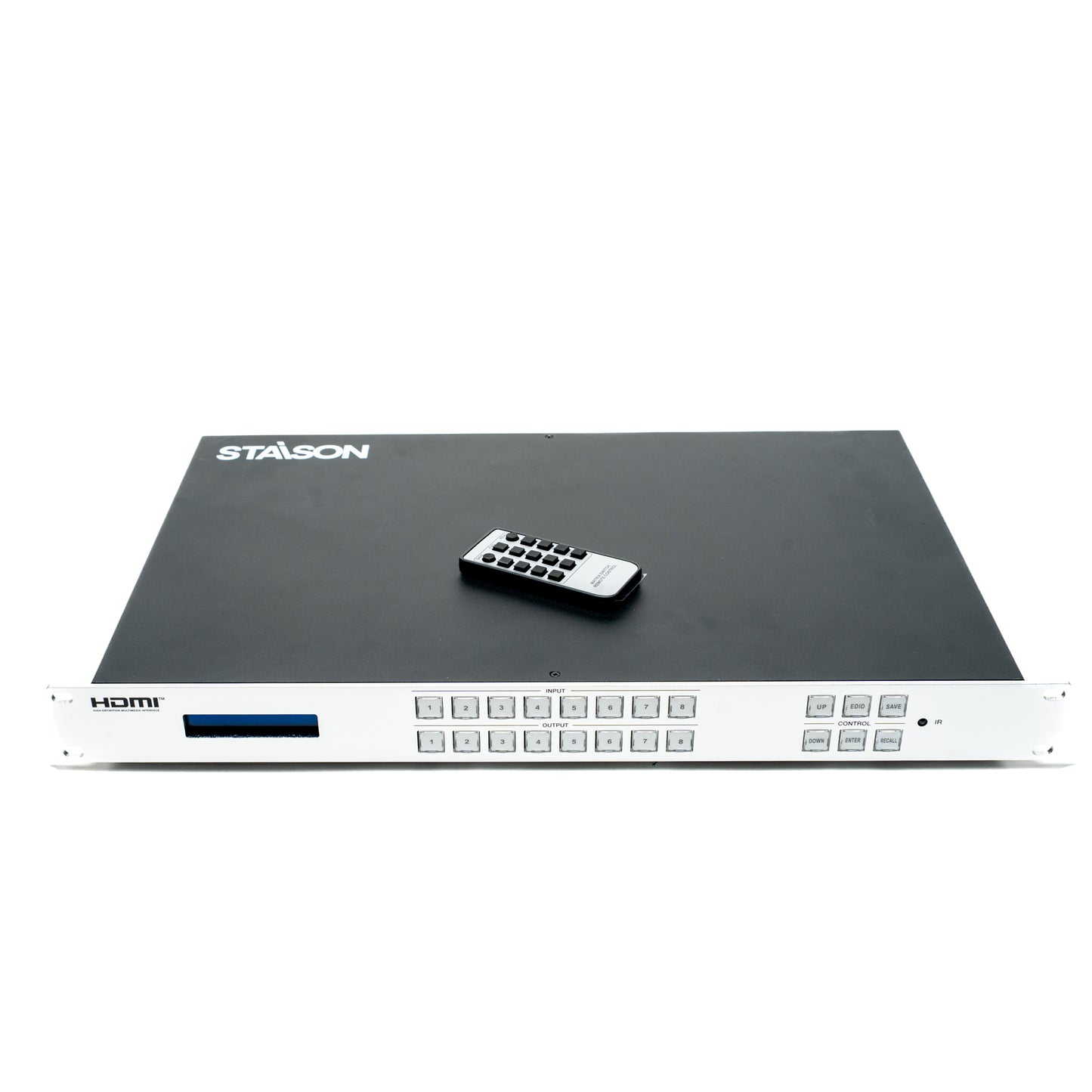
ST-NMX988H 4K30 8x8 HDMITM Matrix
ST-NMX988H 4K30 8x8 HDMITM Matrix
This 4K30 HDMI Matrix is a perfect solution for video transmission from eight HDMI sources
to eight HDMI displays. 8 channel inputs support video resolution up to 4K30Hz. 8 channel
outputs support independent resolution scaler mode (Bypass/4K->1080P/Auto). This matrix
supports up to 8 scene presets, which can be saved, recalled or cleared. Advanced EDID
management is supported.
This matrix can be controlled through the front panel buttons, IR remote control, RS-232
commands and Web GUI.
Features
☆ 8x8 matrix switching
☆ HDCP 2.2 compliant
☆ Supports 10.2Gbps video bandwidth
☆ 8 channel inputs support video resolution up to 4K30Hz, as specified in HDMI 1.4
☆ 8 channel outputs support independent resolution scaler mode (Bypass/4K->1080P/Auto)
☆ HDMI audio formats: LPCM 2.0/5.1/7.1CH, Dolby Digital, DTS 5.1, Dolby Digital+, Dolby
TrueHD, DTS-HD Master Audio, Dolby Atmos, DTS:X
☆ Advanced EDID management, supporting preset EDID, copy EDID, custom EDID (upload)
☆ Up to 8 preset scenes, which can be saved, recalled or cleared
☆ 1U rack mounted design with front panel LCD display
☆ Control via the front panel buttons, IR remote control, RS-232 commands and Web GUI
Package Contents
① 1x 4K30 8x8 HDMI Matrix
② 1x IR Remote
③ 1x 12V/2.5A Multinational Power Supply (Locking)
④ 1x User Manual
Specifications
| Technical | |
| Video Bandwidth | 10.2Gbps |
| Video Resolution | 480i ~ 4K@30Hz |
| Color Space | RGB, YCbCr 4:4:4, YUV 4:4:4, YCbCr 4:2:2/4:2:0 |
| Color Depth | 8-bit, 10-bit, 12-bit (1080p@60Hz); 8-bit (4K2K@30Hz YUV4:4:4); 8-bit, 10-bit, 12-bit (4K2K@30Hz YCbCr 4:2:2/4:2:0) |
| HDMI Audio Formats | LPCM 2.0/5.1/7.1, Dolby Digital, DTS 5.1, Dolby Digital+, Dolby TrueHD, DTS-HD Master Audio, Dolby Atmos, DTS:X |
| HDMI Compliance | HDMI 1.4 |
| HDCP Compliance | HDCP 2.2 |
| ESD Protection | IEC 61000-4-2: ±8kV (Air-gap discharge) & ±4kV (Contact discharge) |
| Connection | |
| Input | 8x INPUT [HDMI Type A, 19-pin female] |
| Output | 8x OUTPUT [HDMI Type A, 19-pin female] |
| Control | 1x RS-232-IN [D-Sub 9, female]; 1x LAN [RJ45] |
| Recommended HDMI Cable | |
| 4K30 Resolution | 10m / 33ft |
| 1080P60 Resolution | 15m / 49ft |
| Mechanical | |
| Housing | Metal Enclosure |
| Color | Front panel: Silver; Rear case: Black |
| Dimensions | 440mm (W) × 285mm (D) × 44.5mm (H) |
| Weight | 3.45kg |
| Power | |
| Power Supply | Input: AC 100~240V 50/60Hz; Output: DC 12V/2.5A (US/EU standard, CE/FCC/UL certified) |
| Power Consumption | 23.4W (MAX) |
| Environmental | |
| Operating Temperature | 0°C ~ 40°C / 32°F ~ 104°F |
| Storage Temperature | -20°C ~ 60°C / -4°F ~ 140°F |
| Operating Humidity | 20%~80% (Relative Humidity, non-condensing) |
| Storage Humidity | 10%~90% (Relative Humidity, non-condensing) |
Operation Controls and Functions
Front Panel

| No. | Name | Function Description |
|---|---|---|
| 1 | LCD Screen | The software version and IP address of the matrix is displayed on the screen after powering on. Information such as the current input/output channel mapping, and EDID can be displayed by pressing front panel buttons. |
| 2 | INPUT/OUTPUT (1~8) Buttons | Input and output channel switching buttons. Firstly press the INPUT (1-8) button to select the input channel, the corresponding input button light in green and the channel number will be displayed on the LCD screen. Then press the OUTPUT (1-8) button to select one or multiple output channels to complete the "one-to-one" or "one-to-many" matrix switching. |
| 3 | CONTROL Buttons |
UP: Press the UP button to select the previous item. DOWN: Press the DOWN button to select the next item. EDID: Used to set the EDID mode of the input channel. Press the EDID button to enter EDID setting mode, and press the INPUT (1~8) button to select the input channel, then press the UP/DOWN button to select the desired EDID. Finally, press the ENTER button to confirm and save the settings. Pressing the EDID button twice can return to the home page. ENTER: Used to confirm and save EDID settings. SAVE: Used to save the preset scene. Up to 8 scenes can be saved. Press buttons "SAVE+OUTPUT n" to save the current routing scene as scene n (n=1~8). RECALL: Used to recall the saved scene. Press buttons "RECALL+OUTPUT n" to recall routing scene n (n=1~8) as the current routing. |
| 4 | IR Window | IR signal receiving window, receiving the IR signal of IR remote. |
Rear Panel

| No. | Name | Function Description |
|---|---|---|
| 1 | INPUT 1~8 Ports | HDMI signal input ports, connected to HDMI source devices such as PC, DVD or Set-top box with an HDMI cable. |
| 2 | OUTPUT 1~8 Ports | HDMI signal output ports, connected to HDMI display devices such as TV or Monitor with an HDMI cable. |
| 3 | RS-232-IN Port | RS-232 serial port, connected to the PC or control system to upgrade firmware, or control the matrix through API commands. |
| 4 | LAN Port | LAN port, used for network control. Users can access to the Web GUI through this port to control the matrix. |
| 5 | DC 12V | DC 12V/2.5A power input port. |
| 6 | Power Switch | Used to switch on/off the power of the matrix. |
IR Remote

| Button | Function Description |
|---|---|
| SAVE | Press this button to save the scene. |
| EDID | Press this button to switch the EDID. |
| RECALL | Press this button to recall the saved scene. |
| 1 / 2 / 3 / 4 / 5 / 6 / 7 / 8 | The numbers 1-8 are equivalent to the number buttons on the front panel. In the "stateless mode", pressing the number button 1 will enter the "INPUT" mode, and then pressing the number button n again will select OUTPUT n (n=1~8). In different modes, the number buttons 1~8 represent different functions, but the logic is the same as the 1~8 number buttons on the front panel. |
| 9 | The function of the 9 button is the same as the DOWN button on the front panel. |
| 0 | The function of the 0 button is the same as the UP button on the front panel. |
| RETURN | Press this button to return to the main menu. |
| ENTER | Press this button to confirm the EDID switching. |
Application Example

Product features
Product features
Materials and care
Materials and care
Merchandising tips
Merchandising tips