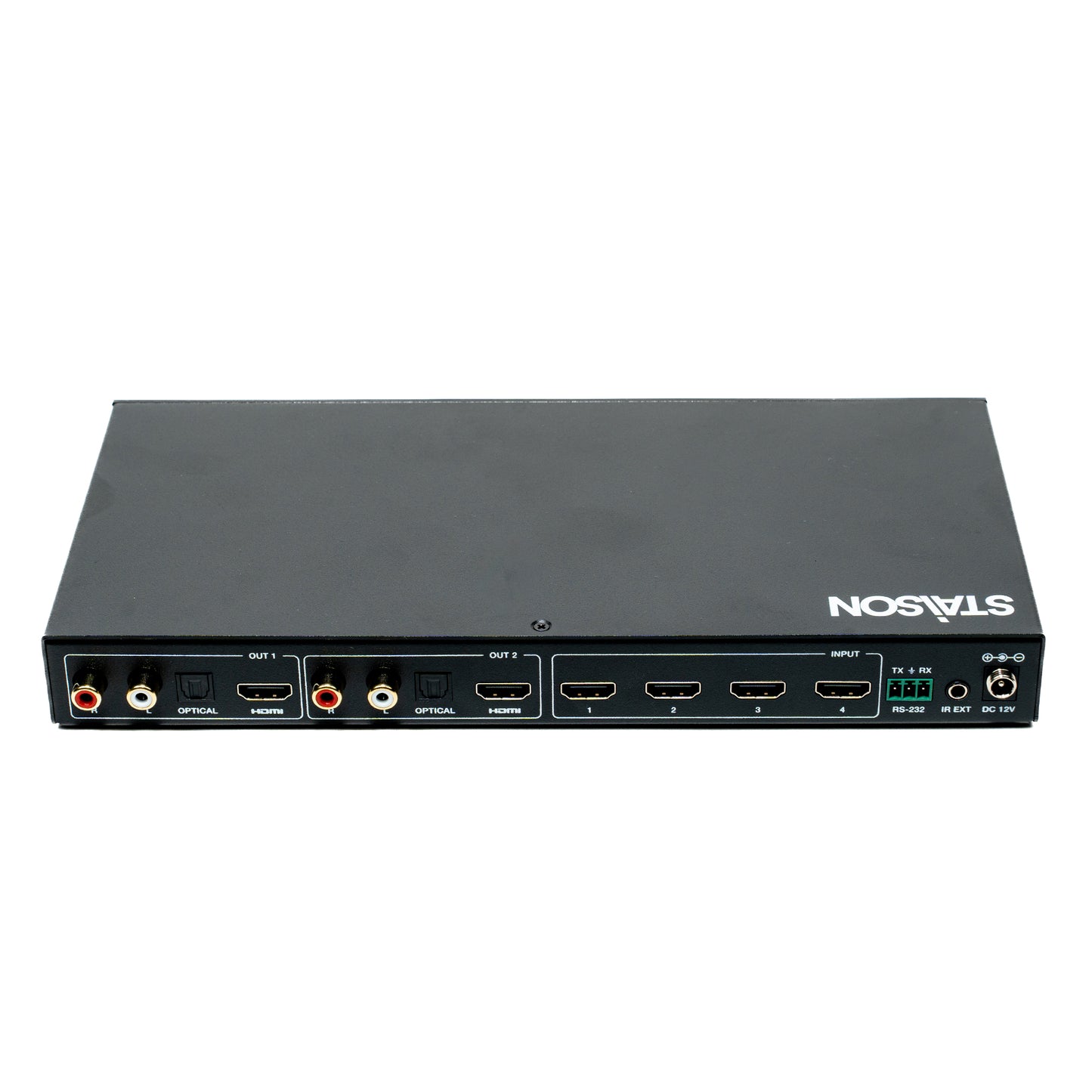
ST-NMXB42MV 4K60 4x2 Multiviewer Seamless UHD Video Matrix Switcher
ST-NMXB42MV 4K60 4x2 Multiviewer Seamless UHD Video Matrix Switcher
This 4x2 Multiviewer Seamless UHD Video Matrix Switcher was developed
for the purpose of supporting higher output resolution (4K@60) for multiple
sources on two screens. It can accept 4 HDMI™ input digital sources and
combine 4 video signals onto 2 HDMI™ UHD or HD monitors independently.
The user can manage each input, and create combinations of the 4 inputs
on 2 displays, as well as adjust the position of any input.
This product supports 8 display modes, within the mode range, users can
freely switch 4-channel HD input signals. It can realize single screen display
and multiview display on a single screen.
This product supports full range of input video resolutions up to 4K@60 (RB)
and audio RCA /Optical de-embedding supported for external audio
distribution systems.
This Matrix Switcher can be controlled via front panel buttons, IR remote,
OSD menu navigation, Controller software, RS-232 commands.
Features
☆ HDCP 2.2 and HDCP 1.x compliant
☆ 18Gbps uncompressed bandwidth, input and output resolution up to
4K2K@60 4:4:4, as specified in HDMI™ 2.0b
☆ HDMI™ audio formats support LPCM, DD+, DTS, Dolby TrueHD,
DTS HD-master pass-through
☆ Seamless switching between input channels
☆ Combined multiple images independent layouts to display on two
UHD TVs
☆ Up to 8 display modes: Single, PIP, PBP(1), PBP(2), Triple(1),
Triple(2), Quad(1), Quad(2)
☆ Audio de-embedding via analog and optical fiber audio ports
☆ Control via front panel buttons, IR remote, OSD menu navigation,
Controller software, RS-232 commands
☆ Each output port supports Scaler function
☆ Support independent audio selection
☆ Advanced EDID management
☆ Compact design for easy and flexible installation
Package Contents
① 1 x 4K60 4x2 Multiviewer Seamless UHD Video Matrix Switcher
② 1 x IR Remote
③ 1 x 3pin-3.81mm Phoenix Connector (male)
④ 1 x 38KHz IR Wideband Receiver Cable (1.5 meters)
⑤ 2 x Mounting Ears
⑥ 4 x Machine Screws (KM3*4)
⑦ 1 x 12V/2.5A Locking Power Adapter
⑧ 1 x User Manual
Specifications
| Technical | |
| HDMI™ Compliance | HDMI™ 2.0b |
| HDCP Compliance | HDCP 2.2 / 1.x |
| Video Bandwidth | 18Gbps |
| Video Resolution | Up to 4K2K@60 4:4:4 |
| Color Depth | 8/10/12-bit |
| Color Space | RGB, YCbCr 4:4:4, YCbCr 4:2:2, YCbCr 4:2:0 |
| Audio Formats | HDMI™ audio: PCM2.0/5.1/7.1CH, Dolby Digital/Plus/EX, Dolby True HD, DTS, DTS-EX, DTS-96/24, DTS High Res, DTS-HD Master Audio Analog audio [3.5mm L/R]: PCM2.0 Optical fiber audio: PCM2.0/5.1/7.1CH, Dolby Digital/plus, DTS 5.1 |
| IR Level | 5Vp-p |
| IR Frequency | 38KHz |
| ESD Protection | IEC 61000-4-2: ±8kV (Air-gap discharge) & ±4kV (Contact discharge) |
| Connection | |
| Input ports | 4 x HDMI™ IN [Type A, 19-pin female] |
| Output ports | 2 x HDMI™ OUT [Type A, 19-pin female] 2 x L/R OUTPUT [RCA] 2 x OPTICAL OUTPUT [S/PDIF] |
| Control ports | 1 x RS-232 [3pin-3.81mm phoenix connector] 1 x IR EXT [3.5mm stereo mini-jack] |
| Mechanical | |
| Housing | Metal Enclosure |
| Color | Black |
| Dimensions | 270mm [W] x 130mm [D] x 30mm [H] |
| Weight | 906g |
| Power | |
| Power Supply | Input: AC 100 - 240V 50/60Hz Output: DC 12V/2.5A (US/EU standard, CE/FCC/UL certified) |
| Power Consumption | 15.72W (Max) |
| Environmental | |
| Operating Temperature | 32°F - 104°F / 0°C - 40°C |
| Storage Temperature | -4°F - 140°F / -20°C - 60°C |
| Operating Humidity | 20%~80% (relative humidity, no-condensing) |
| Storage Humidity | 10%~90% (relative humidity, no-condensing) |
Operation Controls and Functions
Front Panel

| No. | Name | Function Description |
|---|---|---|
| 1 | Power button | ▪ Short press this button to power on the device. ▪ Long press this button for 1 seconds to enter the standby mode. |
| 2 | Power LED | The Power LED will light in green when the product is powered on, and red when the product is on standby. |
| 3 | OUT 1 LEDs | Signal source indicator for the HDMI OUT 1 port. In single screen display mode, when the HDMI OUT 1 port outputs the signal from the HD 1/2/3/4 port, the corresponding green LED will be on. In multiview mode, all OUT 1 LEDs will light in green. |
| 4 | OUT 2 LEDs | Signal source indicator for the HDMI OUT 2 port. In single screen display mode, when the HDMI OUT 2 port outputs the signal from the HD 1/2/3/4 port, the corresponding green LED will be on. In multiview mode, all OUT 2 LEDs will light in green. |
| 5 | IR window | IR signal receiving window. |
| 6 | OUT 1/2 operating buttons |
OUT 1/2 button: ▪ Short press OUT 1/2 button to switch input source for the HDMI OUT 1/2 port, only available in single screen display mode. ▪ Long press OUT 1/2 button, then the OSD menu of the HDMI OUT 1/2 port will display the corresponding input source information. OUT 1/2 Multiview button: The Multiview display mode switching button for the HDMI OUT 1/2 port. ▪ Short press this button to circularly select: Single-PIP-PBP(1)-PBP(2)-Triple(1)-Triple(2)-Quad(1)-Quad(2)-single. ▪ Long press this button for 3 seconds to switch the aspect ratio (16:9/Full) for PBP (1) / PBP (2) / Triple (1) / Triple (2) / Quad (1) / Quad (2). OUT 1/2 RES button: The output resolution switching button for the HDMI OUT 1/2 port. ▪ Short press the RES button, the OSD will display the current output resolution of the HDMI OUT 1/2 port. Short press the RES button again before the OSD disappears to circularly switch the output resolution. ▪ Long press the RES button for 3 seconds to switch the output resolution to 720P60. |
Rear Panel

| No. | Name | Function Description |
|---|---|---|
| 1 | L/R OUT 1 | PCM2.0 Analog audio output port. |
| 2 | OPTICAL OUT 1 | Optical fiber digital audio output port. |
| 3 | HDMI OUT 1 | HDMI signal output port, connected to HDMI display device such as TV or Monitor with HDMI cable. |
| 4 | L/R OUT 2 | PCM2.0 Analog audio output port. |
| 5 | OPTICAL OUT 2 | Optical fiber digital audio output port. |
| 6 | HDMI OUT 2 | HDMI signal output port, connected to HDMI display device such as TV or Monitor with HDMI cable. |
| 7 | HD 1-4 INPUT ports | HDMI signal input ports, connected to HDMI source device such as DVD or Set-top box with HDMI cable. |
| 8 | RS-232 port | 3-pin phoenix connector, connected to a PC or control system for serial port upgrade or RS-232 command control. |
| 9 | IR EXT port | IR signal receiving port, connected with 38KHz IR Receiver cable. If the IR signal receiving window of the unit is blocked or the unit is installed in a closed area out of infrared line of sight, the IR receiver cable can be inserted to the "IR EXT" port to receive the IR remote signal. |
| 10 | DC 12V | DC 12V/2.5A power input port. |
IR Pin Definition
IR Receiver pin's definition is as below:

| Pin | Assignment |
|---|---|
| 1 | IR Signal |
| 2 | Power |
| 3 | Grounding |
IR Remote

| Button Group | Button | Function Description |
|---|---|---|
| ① Power | ||
| Power button | Press this button to power on the switcher or set it to standby mode. | |
| ② OUT 1/OUT 2 Buttons | ||
| HD 1/2/3/4 | Press these buttons to select input source in single screen display mode, and the corresponding input LED on the front panel will light in green. | |
| ◄ ► | Press these buttons to circularly select the last or next input source in single screen display mode. | |
| ⊞ (Multiview) | Multiview display mode switching button. Short press this button to circularly select: Single - PIP - PBP(1) - PBP(2) - Triple(1) - Triple(2) - Quad(1) - Quad(2). | |
| 16:9 | Press this button to switch the aspect ratio (16:9/Full) for PBP (1) / PBP (2) / Triple (1) / Triple (2) / Quad (1) / Quad (2) display mode. | |
| A-IN | Press this button to pop up the audio channel selection OSD, then press the ▲ / ▼ button to select the audio output channel. (The output audio follows the video source by default.) | |
| Mute | Press this button to mute / unmute the audio. | |
| RES | Output resolution switching button. ▪ Short press the RES button to circularly switch the output resolution of the HDMI OUT 1/2 port. ▪ Long press the RES button for 3 seconds to switch the output resolution to 720P60. |
|
| ③ OSD Navigation | ||
| Out 1 | Press this button to enter the OSD menu of the HDMI OUT 1 port, and set the corresponding function by pressing ▲ / ▼ / ◄ / ► / OK button. | |
| Out 2 | Press this button to enter the OSD menu of the HDMI OUT 2 port, and set the corresponding function by pressing ▲ / ▼ / ◄ / ► / OK button. | |
| Exit | Press this button to exit the OSD settings layer by layer. | |
EDID Settings
User can select following EDID modes via RS-232 commands or OSD menu navigation or Controller software.
| No. | EDID Mode | No. | EDID Mode |
|---|---|---|---|
| 1 | 4K2K60_444, Stereo Audio 2.0 | 11 | 1680x1050, Stereo Audio 2.0 |
| 2 | 4K2K60_444, Dolby/DTS 5.1 | 12 | 1600x1200, Stereo Audio 2.0 |
| 3 | 4K2K60_444, HD Audio 7.1 | 13 | 1440x900, Stereo Audio 2.0 |
| 4 | 4K2K30_444, Stereo Audio 2.0 | 14 | 1360x768, Stereo Audio 2.0 |
| 5 | 4K2K30_444, Dolby/DTS 5.1 | 15 | 1280x1024, Stereo Audio 2.0 |
| 6 | 4K2K30_444, HD Audio 7.1 | 16 | 1024x768, Stereo Audio 2.0 |
| 7 | 1080P, Stereo Audio 2.0 | 17 | 720p, Stereo Audio 2.0 |
| 8 | 1080P, Dolby/DTS 5.1 | 18 | AUTO |
| 9 | 1080P, HD Audio 7.1 | 19 | USER1 |
| 10 | 1920x1200, Stereo Audio 2.0 |
Video & Audio
The switcher supports multiple resolution video input up to 3840x2160@60, and supports multiple audio formats (PCM2.0/5.1/7.1CH, Dolby Digital/Plus/EX, Dolby True HD, DTS, DTS-EX, DTS-96/24, DTS High Res, DTS-HD Master Audio) pass-through function via HDMI cable.
The switcher supports following video output resolutions via a powerful scaling engine.
| No. | Output Resolution | No. | Output Resolution |
|---|---|---|---|
| 1 | 4096x2160p 60Hz | 8 | 1920x1080p 60Hz |
| 2 | 4096x2160p 50Hz | 9 | 1920x1080p 50Hz |
| 3 | 3840x2160p 60Hz | 10 | 1360x768p 60Hz |
| 4 | 3840x2160p 50Hz | 11 | 1280x800p 60Hz |
| 5 | 3840x2160p 30Hz | 12 | 1280x720p 60Hz |
| 6 | 3840x2160p 25Hz | 13 | 1280x720p 50Hz |
| 7 | 1920x1200p 60Hz RB | 14 | 1024x768 60Hz |
| 15 | AUTO |
Multiview
The switcher supports 8 categories of multiview display modes: Single, PIP, PBP (1), PBP (2), Triple (1), Triple (2), Quad (1), Quad (2)
Users can select different operations for different multiview modes as following:

| Display Mode | Available Operations |
|---|---|
| Single | Inputs selection |
| PIP | Inputs selection, Sub window size and position selection |
| PBP (1), PBP (2), Triple (1), Triple (2), Quad (1), Quad (2) | Inputs selection, Display mode selection, Display aspect selection |
User can select multiview display modes via RS-232 commands or OSD menu navigation or Controller software.
OSD Menu Navigation
A total of eight buttons on the IR Remote are used for OSD menu navigation, including OUT 1, OUT 2, Exit, ▲, ▼, ◄, ►, OK.
| Menu Level 1 | Menu Level 2 | Menu Level 3 | Options |
|---|---|---|---|
| Output | Resolution | 4096x2160p 60Hz / 4096x2160p 50Hz / 3840x2160p 60Hz / 3840x2160p 50Hz / 3840x2160p 30Hz / 3840x2160p 25Hz / 1920x1200p60Hz RB / 1920x1080p 60Hz / 1920x1080p 50Hz / 1360x768p 60Hz / 1280x800p 60Hz / 1280x720p 60Hz / 1280x720p 50Hz / 1024x768 60Hz / AUTO | |
| BLACKSCREEN | BLACKSCREEN, BLUESCREEN | ||
| Multiview | Single | Input select | HDMI1, HDMI2, HDMI3, HDMI4 |
| PIP | Win1 Select | HDMI1, HDMI2, HDMI3, HDMI4 | |
| Win2 Select | HDMI1, HDMI2, HDMI3, HDMI4 | ||
| PIP Position | Right Bottom, Right Top, Left Bottom, Left Top | ||
| PIP Size | Small, Middle, Large | ||
| PBP | Win1 Select | HDMI1, HDMI2, HDMI3, HDMI4 | |
| Win2 Select | HDMI1, HDMI2, HDMI3, HDMI4 | ||
| MODE | 1, 2 | ||
| Aspect | Full, 16:9 | ||
| 3 x WIN | Win1 Select | HDMI1, HDMI2, HDMI3, HDMI4 | |
| Win2 Select | HDMI1, HDMI2, HDMI3, HDMI4 | ||
| Win3 Select | HDMI1, HDMI2, HDMI3, HDMI4 | ||
| MODE | 1, 2 | ||
| Aspect | Full, 16:9 | ||
| 4 x WIN | Win1 Select | HDMI1, HDMI2, HDMI3, HDMI4 | |
| Win2 Select | HDMI1, HDMI2, HDMI3, HDMI4 | ||
| Win3 Select | HDMI1, HDMI2, HDMI3, HDMI4 | ||
| Win4 Select (Audio Source) | WIN1, HDMI1, HDMI2, HDMI3, HDMI4 | ||
| MODE | 1, 2 | ||
| Aspect | Full, 16:9 | ||
| System | VKA | OFF ON, OFF | |
| ITC | 1, 2 | ||
| Baud rate | 115200, 57600, 38400, 19200, 9600 | ||
| Language/语言 | English, 中文 | ||
| EDID | 4K60-2.0, 4K60-5.1CH, 4K60-7.1CH, 4K30-2.0CH, 4K30-5.1CH, 4K30-7.1CH, 1080P-2.0CH, 1080P-5.1CH, 1080P-7.1CH, 1920x1200-2.0CH, 1680x1050-2.0CH, 1600x1200-2.0CH, 1440x900-2.0CH, 1360x768-2.0CH, 1280x1024-2.0CH, 1024x768-2.0CH, 720P-2.0CH, AUTO, USER1 | ||
| Reset | Reset | ||
| AUDIO | A-IN | Audio Select | WIN1, HDMI1, HDMI2, HDMI3, HDMI4 |
| AUDIO-MUTE | Mute | Audio Mute | ON, OFF |
| FW Version | Read only |
A total of two buttons on the IR Remote are used for audio setting on OSD menu navigation, including A-IN, Mute.
Application Example

Product features
Product features
Materials and care
Materials and care
Merchandising tips
Merchandising tips