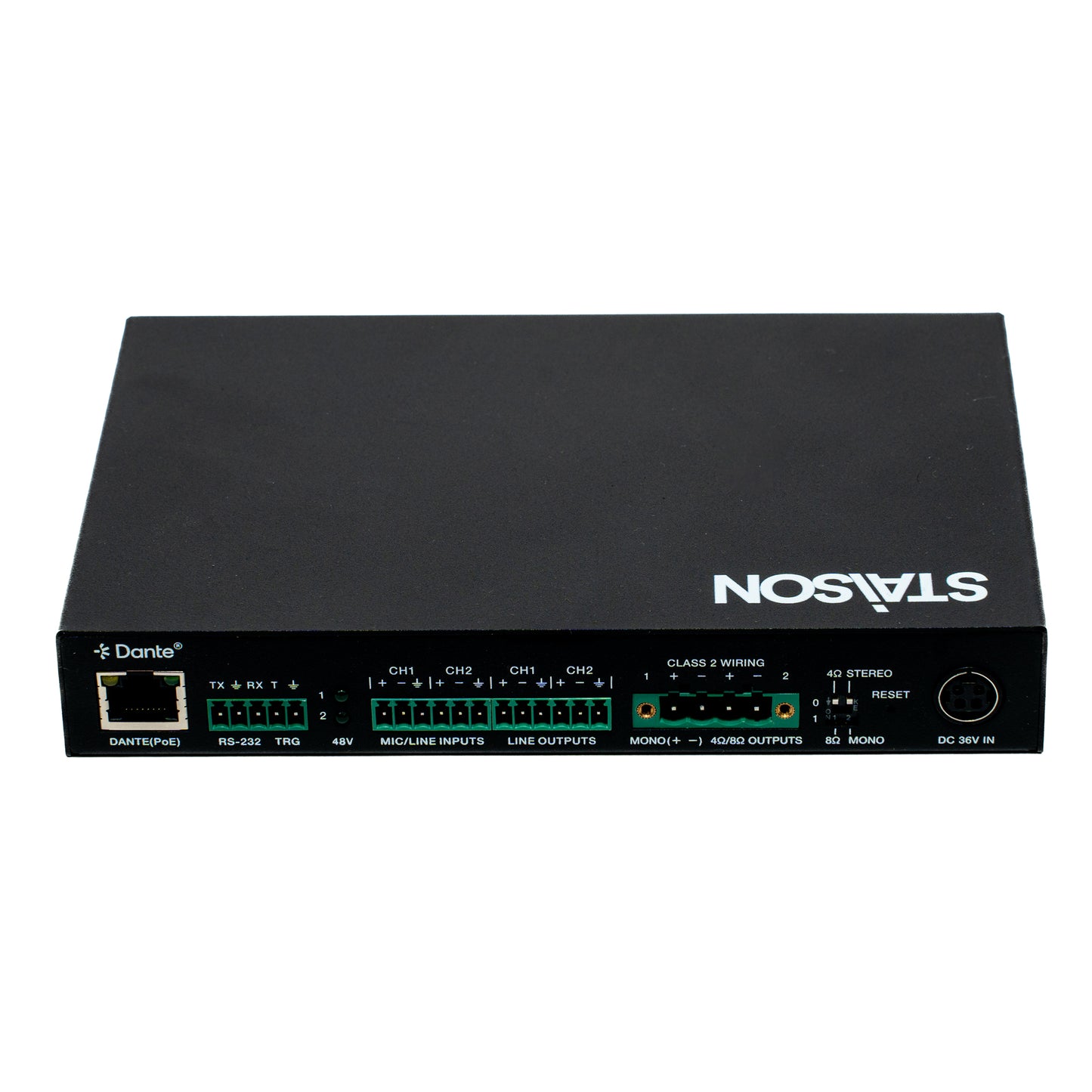
ST-NPA70DP 2x35W Class D Audio Amplifier with Dante® and Line/Mic Inputs (4/8ohm)
ST-NPA70DP 2x35W Class D Audio Amplifier with Dante® and Line/Mic Inputs (4/8ohm)
This product is designed as a two-channel amplifier using class D amplifier technology. It can
be used for powering low impedance (4Ω/8Ω) stereo systems with a maximum power of 2x
35 Watts or 1x 70 Watts (Mono). It features Dante® 2-channel digital inputs and outputs, and
2-channel balanced or unbalanced analog inputs and outputs.
Analog input supports microphone input as well as 48V phantom power for condenser
microphones. This product built-in audio DSP for gain, mixing, matrixing, equalizer, volume
and delay control. This amplifier can be controlled via RS-232, TCP/IP and Web GUI. This
product is suitable for a vast range of AV installations.
Features
☆ Advanced 70W Class-D audio amplifier with Dante® integration
☆ 2x 35W@4/8ohm, 1x 70W@4/8ohm
☆ Dante® 2x2 and AES67 audio input/output supported
☆ Balanced/unbalanced analog input and output for cascading connection
☆ Dante® 2CH digital audio, balanced or unbalanced line level analog and AMP outputs
☆ Supports microphone input with 48V phantom power
☆ Audio DSP processing includes gain, ducking, mixing, matrixing, equalizer, volume and
delay control
☆ Audio output supports 8 band PEQ adjustment (with +15dB/-15dB gain), and a maximum
of 50ms delay setting
☆ Auto standby mode (0~100 minutes can be set) with signal sensing
☆ Local 5-12V input trigger for disabling amplifier output
☆ Integrated web page function, which can control the local machine and query the working
status of the product through the web page
☆ Supports network control function, slave devices in the same network segment can be
controlled through the set host
☆ Dante audio support: 44.1kHz, 48kHz, 88.2kHz, and 96kHz sampling rates @ 16/24bit
☆ Dante audio delay supports settings of 2, 3, 4, 5 or 10ms
☆ Flexible control via front panel buttons, RS-232, TCP/IP and Web GUI
☆ Power via PoE or local DC power supply (Amplifier power limited when using PoE)
Package Contents
① 1x 2x35W Class D Audio Amplifier
② 2x 6pin-3.5mm Phoenix Connector (male)
③ 1x 5pin-3.5mm Phoenix Connector (male)
④ 1x 4pin-5.08mm Phoenix Connector (male)
⑤ 2x Mounting Ear
⑥ 4x Machine Screw
⑦ 1x 36V/2.5A Multinational Power Supply (1.5 meters)
⑧ 1x User Manual
Specifications
| Technical | |
| Network Bandwidth | 100M |
| Audio Format | Dante® [Dante/AES67 digital audio in/out, PCM 2CH 44.1K-96kHz 16/24Bit] LINE IN [Analog audio, Balanced/unbalanced, Max input level 24dBu] MIC IN [Analog audio, Balanced/unbalanced, Min input level -35dBV] LINE OUT [Analog audio, Balanced/unbalanced, Max output level 2V RMS] AMP OUT [Analog audio, Balanced 2CH, Max output power 2x35W@4/8ohm Stereo, 1x70W@4/8ohm Mono] |
| Output Power | 2x35W@4/8ohm Stereo, 1x70W@4/8ohm Mono |
| Amplifier Type | Class D |
| Transmission Distance | 328ft/100m (CAT6/6A/7) |
| Output Level | Max 2V RMS @ balanced audio Max 2V RMS @ unbalanced audio |
| Audio THD+N | < 0.01% at +4dBu, 1KHz |
| Audio S/N Ratio | >100dB@0dBu, 1kHzA-weighted |
| Frequency Response | 20Hz to 20kHz (-/+0.5dB) |
| Dynamic Range | >100dB@0dBu, 1kHzA-weighted |
| Input Level | Max 24dBu (12.28Vrms) @ balanced line audio Max 18dBu (6.14Vrms) @ unbalanced line audio Min -35dBV (17.78mVrms) @ balanced mic audio |
| Input Impedance | 20K Ohm balanced 10K Ohm unbalanced |
| Output Impedance | 600 Ohm balanced 300 Ohm unbalanced |
| Audio Output Delay | <1ms |
| Audio Latency | Configurable Dante® device latency: (Supports 2, 3, 4, 5 or 10ms configurable using Dante Controller) Configurable AMP/analogue output latency: (0~50ms) |
| ESD Protection | IEC 61000-4-2: ±8kV (Air-gap discharge), ±4kV (Contact discharge) |
| Connection | |
| Input | 1x MIC/LINE IN [6pin-3.5mm phoenix connector] |
| Output | 1x LINE OUT [6pin-3.5mm phoenix connector] 1x 4/8Ω AMP OUT [4pin-5.08mm locking phoenix connector] |
| Control | 1x RS-232 [3pin-3.5mm phoenix connector, API commands control] 1x TRIGGER [2pin-3.5mm phoenix connector, high/Low level configurable to disable amp out] 1x DANTE/IP [RJ45 connector, PoE+/PD (Class 8 IEEE 802.3bt)] [Dante/AES67, Web GUI and TCP/IP] |
| Mechanical | |
| Housing | Metal Enclosure |
| Color | Black |
| Dimensions | 180mm [W] × 118mm [D] × 28mm [H] |
| Weight | 670g |
| Power Supply | (1) 36V/2.5A 4PIN Locking Power Supply (2) PoE++ Type 4 Class 8 |
| Power Consumption (Max) | 94.6W (Test with 1k sine wave, audio amplifier output is connected to 4Ω resistance) |
| Operating Temperature | 0°C ~ 40°C / 32°F ~ 104°F |
| Storage Temperature | -20°C ~ 60°C / -4°F ~ 140°F |
| Operating Humidity | 20%~80% (relative humidity, non-condensing) |
| Storage Humidity | 10%~90% (relative humidity, non-condensing) |
Operation Controls and Functions
Front Panel

| No. | Name | Function Description |
|---|---|---|
| 1 | Power LED | Green ON: The system is powered up (PoE or DC power supply). Red ON: The system is in standby mode. OFF: The system is powered off. |
| 2 | ID (show me) LED | This LED indicates the presence of the product. Flash: Device identification OFF: No device identification It can be controlled through Web GUI or API command. For example, when selecting the "On" option for "DANTE Identification" on the System page of the Web GUI, the ID (show me) LED on the front panel will flash, so that you can find the corresponding machine in the system. |
| 3 | LINE/DANTE LED | Input signal source indicators. When the DANTE or LINE IN port detects signal input, the corresponding green DANTE/LINE LED will be on. |
| 4 | LCD screen | The LCD screen displays the status information of the product. With menu buttons operation, the user can query the software version, or set the input gain, DHCP on/off, output audio volume. |
| 5 | MENU button | Used to query/set various function of the product, including input gain adjustment, network setting, output audio volume adjustment, software version query. |
| 6 | UP button | Press the UP button to select the previous item. |
| 7 | DOWN button | Press the DOWN button to select the next item. |
| 8 | ENTER button | Press the ENTER button to confirm and execute the operation. |
Rear Panel

| No. | Name | Function Description |
|---|---|---|
| 1 | DANTE port | Dante® network port, supporting PoE, with the following two functions: (1) Dante® audio input and output port. (2) Web GUI and TCP/IP control port. |
| 2 | RS-232 / TRG Port | RS-232: Serial control port, used for RS-232 signal pass-through or controlling this product via API commands. TRG: Trigger signal input port, effective at rising edge voltage and falling edge voltage. When the input trigger is detected, the amplifier will enter the protected mode (mute the audio). For details, please refer to the input trigger settings on the System page of Web GUI. |
| 3 | 48V Phantom Power LEDs | Two 48V Phantom power indicators. Green ON: Phantom power on. OFF: Phantom power off. |
| 4 | MIC/LINE INPUTS Port | LINE analogue audio input port, supporting balanced/unbalanced 2CH, with a Max input level of 24dBu. MIC analogue audio input port, supporting balanced/unbalanced 2CH, with a Min input level of -35dBV. |
| 5 | LINE OUTPUTS Port | LINE analogue audio output port, supporting balanced/unbalanced 2CH, with a Max output level of 2V RMS. |
| 6 | AMP OUT Port | Analogue audio output port, supporting balanced 2CH, with Max output power 2x35W@4/8ohm Stereo, 1x70W@4/8ohm Mono. 1+/1- and 2+/2- are for Low Impedance (4/8ohm) Stereo Speakers. 1+/1- is for Low Impedance (4/8ohm) Mono Speaker. |
| 7 | AMP Output Mode DIP Switch | Speaker Lo-Z Impedance Select: Toggle up the left switch to connect the 4Ω speaker, or toggle down the left switch to connect the 8Ω speaker. Speaker Lo-Z Connection Select: Toggle up the right switch for stereo dual channel output, or toggle down for bridged mono output. |
| 8 | RESET Button | Short press this button to reset the product. Press and hold this button for 3 seconds to restore to factory default settings (excluding the network). Press and hold this button for 10 seconds to restore to factory default settings (including the network). |
| 9 | DC 36V IN | DC 36V/2.5A power input port. |
Audio Amplifier Output
The audio amplifier can output the same power at both 4 ohms and 8 ohms. The amplifier
output power varies depending on the input power supply or PoE adapter connected to it,
it does this by adjusting the internal gain to allow you to get most of the amplifier. Please
ensure that you select the correct impedance option via the speaker impedance selection
switch on the rear of the device.

Speaker Connections
The audio amplifier only supports Low Impedance (4-8ohm) speakers. It is necessary to
configure the Speaker Impedance Switch as well as wire up the speakers according to the
specific speakers you are using. Wiring examples for each of the available configurations
are as follows:
Low Impedance (4/8ohm) Stereo Speakers:
Speaker Lo-Z Impedance Select: [0] = 4Ω, [1] = 8Ω
Speaker Lo-Z Connection Select: [0] = STEREO

Low Impedance (4/8ohm) Mono Speaker:
Speaker Lo-Z Impedance Select: [0] = 4Ω, [1] = 8Ω
Speaker Lo-Z Connection Select: [1] = MONO

RS-232 Control Command
The product also supports RS-232 command control. Connect the RS-232 port of the product
to a PC with a 3-pin phoenix connector cable and an RS-232 to USB cable. The connection
method is as follows.

Connection Diagram

Product features
Product features
Materials and care
Materials and care
Merchandising tips
Merchandising tips