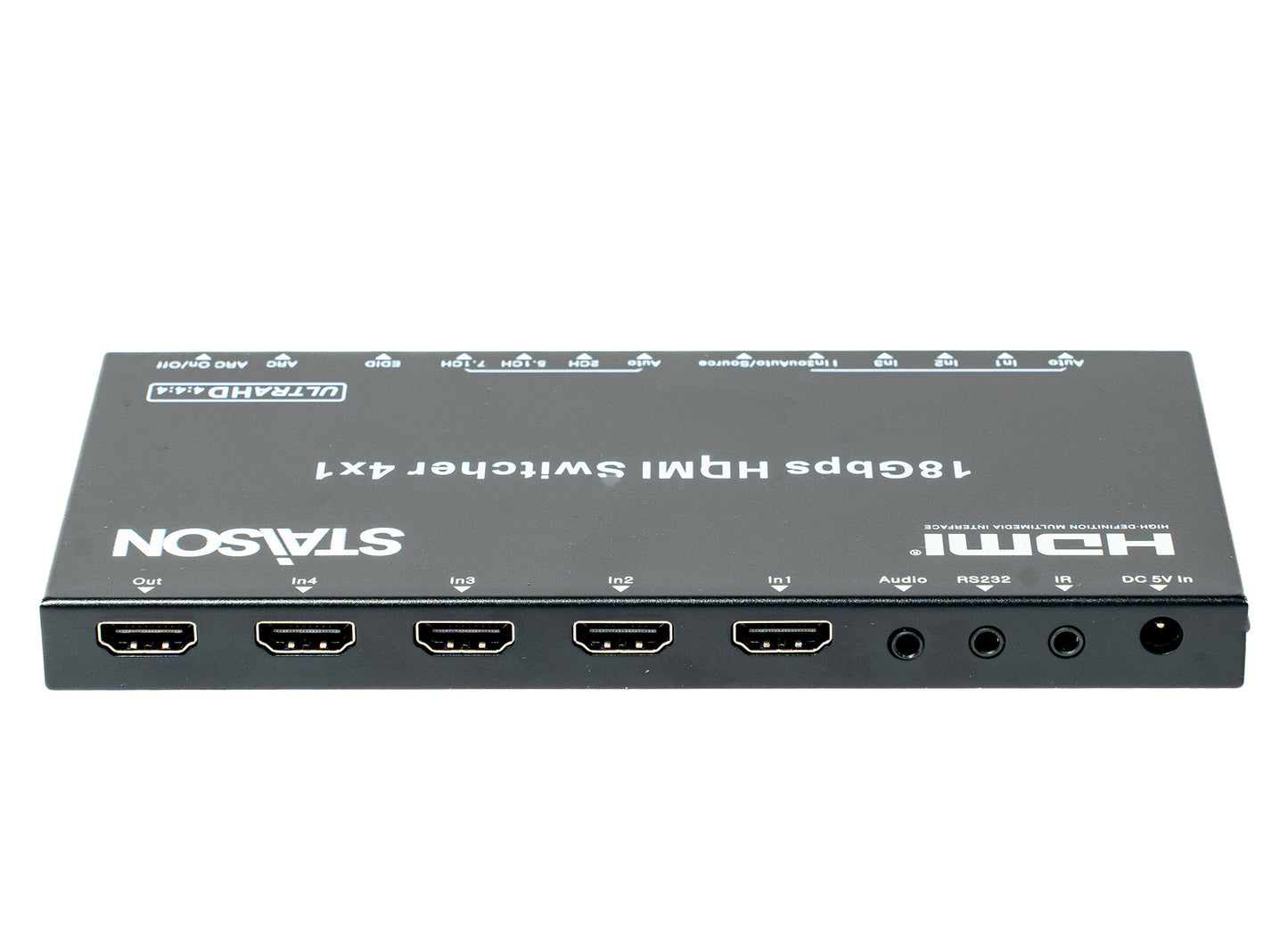
ST-NB41A 4K@60 HDMI Switcher 4×1
ST-NB41A 4K@60 HDMI Switcher 4×1
Regular price
0.00 SAR
Regular price
Sale price
0.00 SAR
Model ST-NB41A · VER 1.1
4K@60 HDMI Switcher 4×1
4 HDMI Inputs → 1 HDMI Output · 4K×2K@60Hz · HDCP 2.2 · ARC · Audio Extraction · EDID Management
This is a high performance HDMI 4×1 switcher that supports HDTV formats up to 4K×2K@60Hz and all HDMI 3D TV formats. It can extract HDMI stream audio to separate digital and analog audio output. This product supports HDCP repeater / CEC / ARC functions. Select any of the inputs by front panel button or IR Remote — the corresponding indicator LED on the front panel will be illuminated.
Features
Compliant with HDMI 2.0a, DVI 1.0 standards
HDCP 2.2 and HDCP 1.4 compliant
Video formats up to 4K×2K@60 and all HDMI 3D video formats
Digital and analog audio output
Support PCM, Dolby TrueHD, DTS-HD Master Audio up to 7.1CH
Support smart EDID management (Auto / 2CH / 5.1CH / 7.1CH selectable)
Support input port auto switching or manual switching mode
Audio Return Channel (ARC) support
Package Contents
11× HDMI 4×1 Switcher
21× 5V/1A Power Adapter
31× 38KHz IR Rx Cable
41× Optical Convert Header (for SPDIF audio output)
51× HDMI 4×1 IR Remote
61× Operation Manual
Specifications
| Parameter | Detail |
|---|---|
| Frequency Bandwidth | 18Gbps |
| Input Ports | 4× HDMI Female ports, 1× IR Receive port, 1× RS232 port |
| Output Port | 1× HDMI Female port, 1× L/R & Optical port |
| HDMI Audio Output | PCM 2.1/5.1/7.1CH, Dolby 5.1, DTS 5.1, Dolby TrueHD, DTS-HD |
| ESD Protection | Human Body Model: ±8kV (air-gap discharge), ±4kV (contact discharge) |
| Dimensions | 180mm [D] × 85mm [W] × 11.6mm [H] |
| Weight | 300g |
| Power Consumption | Max 2.5W |
| Operating Temperature | 0°C ~ 40°C / 32°F ~ 104°F |
| Storage Temperature | -20°C ~ 60°C / -4°F ~ 140°F |
Operation Controls and Functions
Front Panel
| No. | Name | Function Description |
|---|---|---|
| 1 | Input Indicator LED | Corresponding port LED will be illuminated when its input port is selected. |
| 2 | Auto / Manual Select Button | Press >2 seconds to select auto switching or manual switching mode. Under manual switching mode, short press to select input port. |
| 3 | EDID Status LED | EDID status indicator LED (Auto means using TV EDID). |
| 4 | EDID Select Button | Press this button to select EDID mode: Auto / 2CH / 5.1CH / 7.1CH. |
| 5 | ARC Status LED | This LED will be illuminated if ARC is enabled successfully. |
| 6 | ARC Function Button | Press to enable or disable ARC function. ARC LED on front panel will be illuminated if ARC is enabled successfully. |
Rear Panel
| No. | Name | Function Description |
|---|---|---|
| 1 | HDMI Output Port | HDMI output port — connect to HDTV or monitor with HDMI cable. |
| 2 | HDMI Input Ports | 4× HDMI input ports — connect to DVD, PS4 or Set-top Box with HDMI cable. |
| 3 | Audio Output | Audio output port including L/R analog and optical audio output (SPDIF). |
| 4 | RS232 Port | RS232 serial control port. |
| 5 | IR Receiver Port | Connect the included 38KHz IR Rx cable to receive IR remote signals. |
| 6 | DC 5V Input Port | Connect the included 5V/1A power adapter to power the device. |
IR Remote
IR Remote Control
| Button | Function |
|---|---|
| ARC | Press to enable or disable ARC function. ARC LED on front panel will illuminate if ARC is enabled successfully. |
| Auto | Press to select auto switching or manual switching mode. |
| 2.1ch | Select EDID 2.1CH audio mode; corresponding LED illuminates. |
| 5.1ch | Select EDID 5.1CH audio mode; corresponding LED illuminates. |
| 7.1ch | Select EDID 7.1CH audio mode; corresponding LED illuminates. |
| Auto / Source | Under manual switching mode, press to cycle through and select the input port. |
| In 1 ~ In 4 | Directly select HDMI Input 1, 2, 3 or 4. |
Application Example
How it works: Connect up to 4 HDMI sources (DVD, PS4, Set-top Box, Laptop, Game Console, etc.) to the four HDMI input ports on the rear panel. Select the desired source using the front panel button, the IR Remote, or enable auto-switching to detect active sources automatically. The selected source is output to your HDTV or Monitor via the HDMI output port. Simultaneously, the extracted audio is available through L/R analog and Optical SPDIF outputs for connection to a speaker system or audio amplifier.
Product features
Product features
Materials and care
Materials and care
Merchandising tips
Merchandising tips