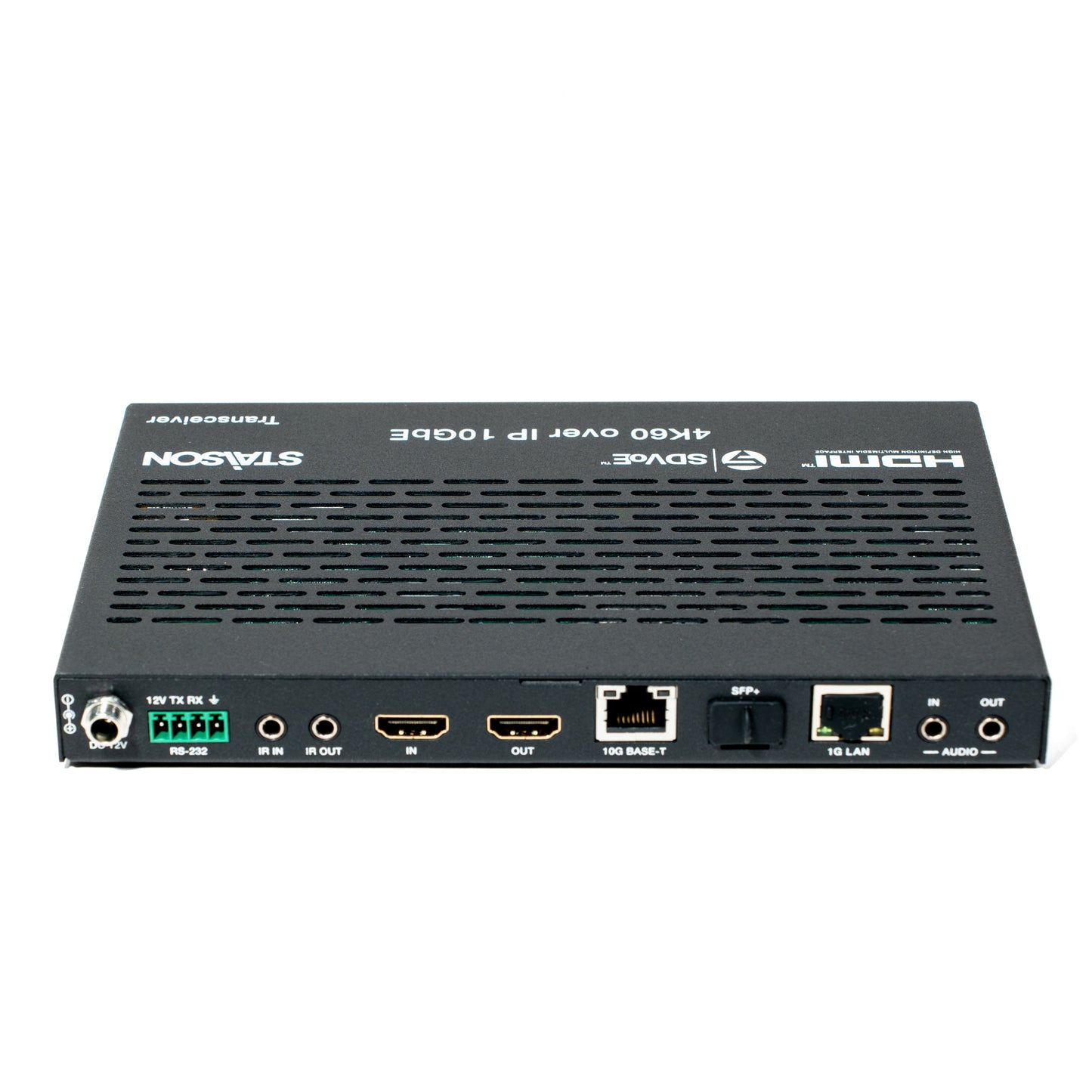
ST‑NEB100AT SDVoE Transceiver with Copper/Fiber Combo Box
ST‑NEB100AT SDVoE Transceiver with Copper/Fiber Combo Box
Features
- BlueRiver AVP2000 Transceiver
- Encoder/Decoder one‑box design with Copper and Fiber full version
- Supports video resolution up to 4K2K@60Hz (HDMI 2.0b)
- HDCP 2.2 compliant, 18 Gbps video bandwidth
- HDR10, Dolby Vision, HLG pass‑through
- LPCM 2/5.1/7.1, Dolby Digital, Dolby Digital+, Dolby TrueHD, Dolby Atmos, DTS 5.1, DTS‑HD Master Audio, DTS:X
- Supports Zero‑Frame latency operating modes
- Seamless switching, video wall up to 9×9, multiviewer up to 25 windows
- Supports USB 2.0, two‑way IR and RS‑232
- Flexible audio routing including bidirectional analog audio transmission between Encoder and Decoder
- Encoder or Decoder mode selectable via front panel button or API
- Built‑in H.264 stream for video preview on portable devices
- Front panel button, IR, RS‑232, TCP/IP, and Web GUI control
- Standard PoE supported (802.3at PD device)
- 10G managed network switch
- Works with IP controller box ST‑NCTL100D
SDVoE Transceiver with
Copper/Fiber Combo Box
The flexible transceiver design allows one box to be set as Encoder or Decoder — ideal for real installation sites and inventory control. The built-in Secondary Stream supports H.264/H.265 compression for portable device preview. Multiple control and data signals are transmitted simultaneously including bi-directional IR, RS-232, USB KVM, CEC and 1G Ethernet.
The unit supports both 10G BASE-T (Copper, 100m CAT6A/7) and 10G SFP+ (Fiber) with automatic port detection and configurable priority. Standard 802.3at PoE is supported, eliminating the need for a separate power supply when connected to a PoE switch.
| Parameter | Specification |
|---|---|
| Technical | |
| HDMI Compliance | HDMI 2.0b |
| HDCP Compliance | HDCP 2.2 |
| Video Bandwidth | 18Gbps |
| Video Resolution | Up to 4K@60Hz 4:4:4 |
| Color Space | RGB, YCbCr 4:4:4 / 4:2:2 / 4:2:0 |
| Color Depth | Full Color-Depth |
| HDR | HDR, HDR10, HDR10+, Dolby Vision, HLG |
| HDMI Audio | LPCM, Dolby Digital/Plus/EX, Dolby TrueHD, Dolby Atmos, DTS, DTS-EX, DTS-96/24, DTS High Res, DTS-HD Master Audio, DSD, DTS:X |
| Analog Audio | Left and Right stereo analog audio |
| ESD Protection | ±8kV (Air-gap discharge) & ±4kV (Contact discharge) |
| Network | |
| Network Video Bandwidth | 10G |
| Input Format | 10GBaseT |
| Transmission Distance | 100m (CAT6A/CAT7) / 70m (CAT6) |
| HDMI Cable Length | |
| 4K60 | 16ft / 5m |
| 4K30 | 32ft / 10m |
| 1080p60 | 50ft / 15m |
| Input Ports | |
| HDMI IN | 1× [Type A, 19-pin female] |
| USB HOST | 1× USB 2.0 [Type B, 4-pin female] |
| IR IN | 1× [3.5mm Jack] |
| AUDIO IN | 1× [3.5mm Jack] |
| RS-232 | 1× [4-pin Phoenix connector] |
| Output Ports | |
| HDMI OUT | 1× [Type A, 19-pin female] |
| AUDIO OUT | 1× [3.5mm Jack] |
| IR OUT | 1× [3.5mm Jack] |
| USB DEVICES | 2× USB 2.0 [Type-A, 4-pin female] |
| Network Ports | |
| 10G BASE-T | 1× [RJ45 jack] |
| SFP+ | 1× [Fiber slot, 10G] |
| 1G LAN | 1× [RJ45 jack] |
| Mechanical | |
| Housing | Metal Enclosure — Black |
| Dimensions | 204mm [W] × 134mm [D] × 21.5mm [H] |
| Weight | 693g |
| Power Supply | Input: AC100–240V 50/60Hz; Output: DC 12V/2.5A (US/EU, CE/FCC/UL certified) |
| Power Consumption | ≈13.5W |
| Environmental | |
| Operating Temperature | 0°C ~ 40°C / 32°F ~ 104°F |
| Storage Temperature | -20°C ~ 60°C / -4°F ~ 140°F |
| Relative Humidity | 20% ~ 90% RH (no condensation) |
Front Panel — LEDs, Mode Button & USB Ports
| No. | Name | Function Description |
|---|---|---|
| 1 | RESET button | Press and hold 5 seconds (power on) to restore default settings. |
| 2 | POWER LED (Red) | On when unit is powered on. Off when powered off. |
| 3 | STATUS LED (Green) | On: System running normally. Flashing / Off: Firmware issue or hardware error. |
| 4 | LINK LED (Green) | On: 10G network port connected. Off: 10G network port not connected. |
| 5 | VIDEO LED (Green) | ENC mode: On = video input detected. DEC mode: On = HDMI OUT has video output. |
| 6 | USB LED (Green) | Flashing: USB devices connected with data transmission. Off: No USB devices connected. |
| 7 | ENC LED (Green) | Always on when device is in Encoder mode. On startup, flashes ~15 seconds, then stays on. After mode switch, flashes ~30 seconds, then stays on. |
| 8 | DEC LED (Green) | Always on when device is in Decoder mode. Same startup/switch behaviour as ENC LED. Also flashes in SHOW ME mode (activated via Controller Box) to identify the device. |
| 9 | MODE button | Press and hold 5 seconds to switch between ENC and DEC mode. The corresponding LED flashes ~30 seconds then stays on to confirm mode switch. |
| 10 | USB DEVICES port | Connect mouse, keyboard or USB storage when product is in DEC mode. |
| 11 | USB HOST port | Connect to PC when product is in ENC mode. |
Rear Panel — All Ports
| No. | Name | Function Description |
|---|---|---|
| 1 | DC 12V port | DC 12V/2.5A power input port. |
| 2 | RS-232 port | Connect to PC or control system via 4-pin phoenix connector for RS-232 signal pass-through. "12V" pin supplies power to the peripheral. |
| 3 | IR IN port | IR signal input port. |
| 4 | IR OUT port | IR signal output port. |
| 5 | HDMI IN port | HDMI signal input port (ENC mode). Connect to HDMI source device (DVD, set-top box) with HDMI cable. |
| 6 | HDMI OUT port | ENC mode: Loop out of HDMI IN signal. DEC mode: Outputs remote Encoder video stream. |
| 7 | 10G BASE-T port | 10G copper network port (RJ45). Connect to 10G Switch for video transmission. Range: 100m (CAT6A/7) / 70m (CAT6). |
| 8 | SFP+ port | 10G fiber optical port. Connect to 10G Switch for video transmission. |
| 9 | 1G LAN port | 1G network port for 1G Ethernet or Secondary Stream transmission. |
| 10 | AUDIO IN port | Analog audio input — stereo audio transmission, Secondary Stream audio embedding, HDMI audio embedding. |
| 11 | AUDIO OUT port | Analog audio output — outputs HDMI extracted stereo audio or remote stereo analog audio signal. |
This transceiver can be mounted in a standard 6U rack (please contact your supplier for 6U rack sale). Up to 10 units can be installed vertically. The mounting steps are as follows:
This transceiver also can be mounted in a standard 1U rack (up to 4 units can be installed horizontally). The mounting steps are as follows:
This transceiver supports playing Secondary Stream on computer through the corresponding software such as VLC media player; simultaneously you can access the built-in Web GUI to configure the Secondary Stream. The operation method shows as below.
The Status page provides basic information about the installed firmware version and the network settings.
Set Main Stream and Sub Stream encoding format (H.265/H.264), resolution, and bitrate. Main Stream horizontal range: 960–1920; vertical: 540–1080 (even numbers). Sub Stream horizontal: 320–960; vertical: 180–540 (even numbers). Click "Apply" to take effect.
Network: Static or DHCP. Static allows manual IP, gateway, subnet mask. DHCP auto-assigns. Web Port sets the web page port. Click "Save". Click "Set Network Defaults" to restore DHCP. Login password can be changed in the Login section.
SOC Update: upgrade firmware. Browse → select firmware → click Update. Progress bar reaches 100% → upgrade complete, machine restarts. IMG Update: upload no-signal picture (jpg, ≤1920×1080, width multiple of 8, height multiple of 2, size <512kB). Progress bar 100% → takes effect without reboot.
| Stream | Network URL |
|---|---|
| MainStream | rtsp://169.254.100.254/live/main/av_stream |
| SubStream | rtsp://169.254.100.254/live/sub/av_stream |
The network switch used must support all of the following features:
| Manufacturer | Recommended Model |
|---|---|
| Netgear | ProSAFE PLUS XS708E |
| Netgear | ProSAFE Smart XS712T |
| Netgear | M7300-24XF XSM7224S |
| Netgear | ProSAFE M4300 Intelligent Edge Series |
| Arista Networks | 7050X Series |
When the Network Switch does not support PoE, the Encoder, Decoder, and Controller Box must be powered by the DC power adapter. Controller Box Control LAN default: DHCP. If no DHCP server is present, the Control LAN port defaults to 192.168.0.225. Set the PC to the same subnet (e.g., 192.168.0.88). Access the Web GUI at http://controller.local or http://192.168.0.225.
How it works: Each unit can be set to ENC or DEC mode via the front-panel MODE button or API — no separate encoder/decoder SKUs needed. In ENC mode, units accept HDMI sources (DVD, set-top box) and transmit uncompressed 4K60 over the 10G Copper (BASE-T) or 10G Fiber (SFP+) port to the switch. In DEC mode, units receive from the switch and output HDMI to TVs. A MultiView decoder shows up to 25 windows simultaneously. Four DECs can tile a Video Wall. The Controller Box manages routing, matrix switching, and system configuration via Web GUI or TCP/IP.
Product features
Product features
Materials and care
Materials and care
Merchandising tips
Merchandising tips